Supplier bill 3-way match
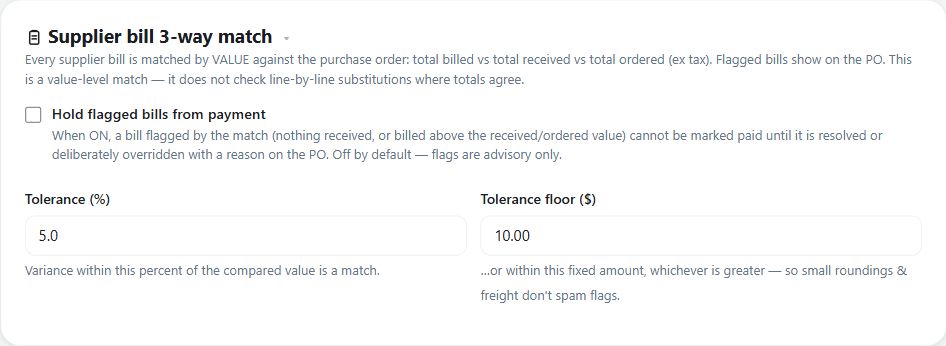
Matches every supplier bill by value against its purchase order - total billed vs total received vs total ordered, ex tax - and flags mismatches on the PO. It is a value-level match, not a line-by-line substitution check.
Use value-level matching to compare ordered, received and billed amounts on a purchase order before deciding how to handle discrepancies.
Before you start
Availability: Team plan and above. Enabled business features, role permissions, connected providers and supported devices may add requirements.
Documented roles: Owner, Office. A role name alone does not override the permissions set by your business.
Where to find it: Money > Purchase orders > Bill match.
Record the purchase order and goods receipts accurately. Review the configured tolerances and whether holding flagged bills from payment is enabled.
Using this guide in United States
- Set your business country in Business settings before entering customer addresses or preparing documents. The country selected on the public website does not change an existing business.
- Check the business currency (USD), time zone and document tax settings. Only enable tax collection if your business is registered and the settings match your requirements. Your customer invoice tax settings are separate from tax on your AllQuote subscription.
- Screenshots use demonstration records. Their sample currency, addresses and tax amounts do not override your business settings.
Step by step
- Open Purchase orders and choose the order; flagged bill matches show on the PO with their status.
- Receive the goods against the PO so the match can re-evaluate - a late receipt clears a nothing-received flag automatically.
- To deliberately accept a flagged bill, override the match on the PO; a reason is mandatory and the actor and time are recorded.
- To hold flagged bills from payment, turn on Hold flagged bills from payment under Business settings > Quoting > Supplier bill 3-way match. It is off by default; tolerances follow the percent-of-baseline plus cents-floor rule.
Worked example
A supplier bill arrives before the goods receipt is recorded. Inspect the flag, record the actual receipt when goods arrive and review the re-evaluated match.
This is an illustrative scenario. Use your own approved scope, quantities, rates and business rules.
Check the result
Compare total billed, received and ordered values excluding tax. If deliberately overriding a flag, record the mandatory reason and review the actor/time trail.
Limits and troubleshooting
This is a value-level match, not line-by-line substitution detection. Payment holds are off by default, and the tolerance combines a percentage baseline with a cents floor.
Check current plans and feature availability · Browse every guide