Construction estimating software from measured scope to a reviewed price.
A drawing gives you quantities; an estimate also needs labor, materials, waste, access and commercial judgment. AllQuote brings editable takeoff measurements and your price book together so you can review the build-up before quoting the work.
For US contractors and field service businesses. Tools, limits and connected services vary by plan and provider availability. Check current availability and pricing.
How the workflow fits together
Measure the scope
Calibrate each plan page using a known dimension, then review areas, lengths, counts and deductions. Use manual entry for quantities not available from a drawing.
Build the estimate
Map reviewed quantities to material, labor or assembly rows. Keep units consistent: meters of a run, square meters of a surface and hours of labor are different inputs.
Check commercial assumptions
Review buying units, waste, access, delivery and selling rates. Mark provisional quantities and exclusions before they become a customer commitment.
Prepare the quote
Insert the selected, reviewed rows into a quote. Check the final scope and totals again before sharing the customer-facing price.
Inside the estimating build-up
Assemblies: reusable material and labor build-ups
Create an assembly with component quantities, units, buying costs and selling prices. Link a compatible measured area, length, volume or count to its rate basis, then review the expanded component lines. This is the reusable build-up that some estimating products call a recipe.
Custom formulas from measured quantities
Reference measured labels in expressions such as [Wall area] * 48.5. Arithmetic and parentheses produce a derived quantity you can review, select and price. Save reusable formulas in the team library; inserting one makes an editable copy for that takeoff.
Waste and purchasing units
Assemblies support component waste allowances and configured rounding to whole purchasing units. For example, a 10 m² tiling scope at 11 tiles per m² produces 110 tiles before any configured waste; 0.25 bags of adhesive per m² produces 2.5 bags, or 3 when whole-bag round-up is configured. These are example inputs, not product coverage recommendations.
Maintained price book and supplier context
Assembly components linked to price-book codes use the current available price index when expanded. Free-text components keep their saved prices. Eligible, authorised Reece connections can supply price-book data; confirm account permissions, availability and the freshness of the source before quoting.
Worked example: allow for flooring waste
A transparent estimating calculation you can check before preparing a quote. These are illustrative inputs, not recommended trade rates.
| Item or stage | Input | Result |
|---|---|---|
| Measured floor | Reviewed plan area | 30 m² |
| Waste allowance | 30 m² × 10% | 3 m² |
| Material requirement | 30 + 3 | 33 m² |
At an illustrative material cost of $40/m², 33 m² costs $1,320 before tax. Check pack sizes and round purchases as needed. Labor, overhead and profit are additional decisions; markup and margin are not the same percentage.
What to check before you commit
Takeoff is not the entire estimate
Plan quantities do not automatically capture access, preparation, delivery, temporary works or labor productivity. Review those separately.
Compare revisions
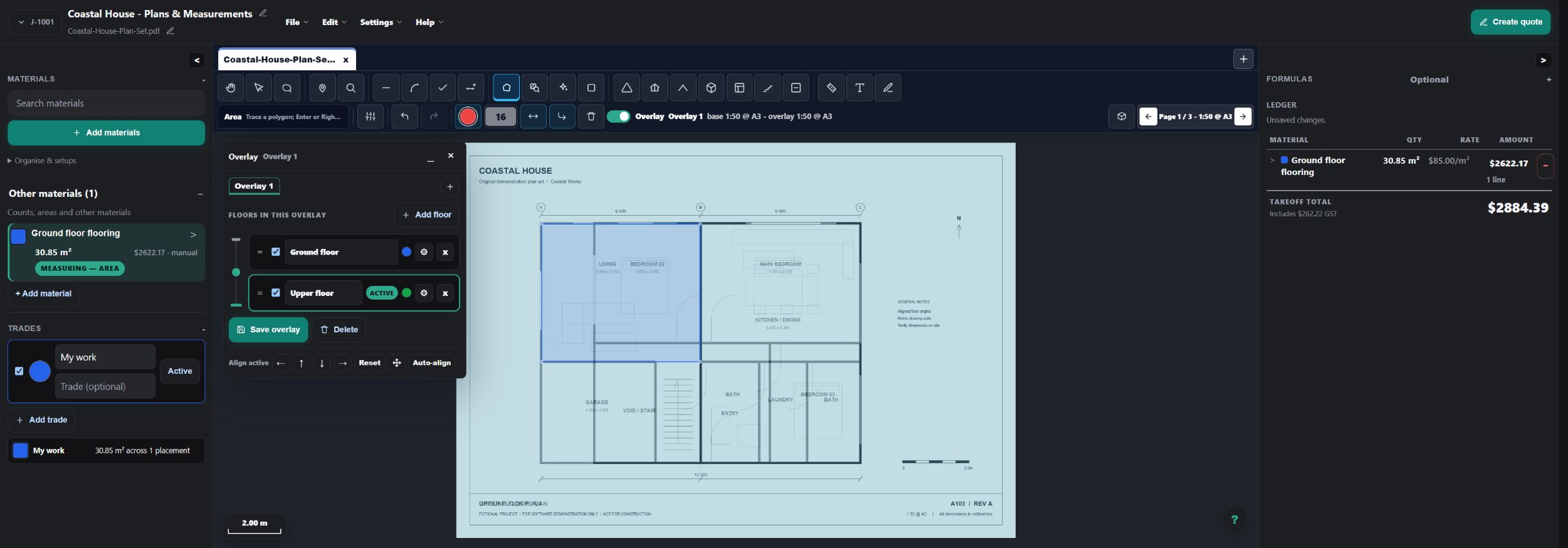
Calibrate and align overlay plans before comparing them. Inspect changed geometry and update affected quantities and prices deliberately.
Check the source
Use legible drawings and current supplier prices. AI-assisted plan suggestions remain beta and need review; they are not a whole-project accuracy guarantee.
Questions about construction estimating software
What is the difference between takeoff and estimating?
Takeoff measures the quantities shown on plans. Estimating applies costs, labor, allowances and selling decisions to the scope. Quoting presents the reviewed offer to the customer.
Does AllQuote supply guaranteed construction rates?
No. Use your own reviewed rates, assemblies and eligible connected supplier data. Pricing depends on scope, location, supplier terms and site conditions.
Can I compare plan revisions?
Yes. The takeoff overlay tools let you align and compare plan layers. Confirm their scale and alignment, then review and update the affected measurements.
Is takeoff included in every plan?
No. Plan Takeoff is a Business-plan tool. Use the current pricing comparison to check estimating, price book and assembly availability for your business.
Will supplier price changes automatically alter a quote I have already issued?
Do not assume that updating a price book rewrites an issued customer quote. Review current inputs while estimating and follow the quote's revision and approval workflow for changes. A supplier connection is not a guarantee against price movement or margin loss.
Explore the next step
Read the takeoff quickstart, or open the read-only live demo with sample data.
Jump to volume and depth, formulas, assemblies or overlay comparison in the existing screenshot-led guide.