Scale detection and calibration
Checks plan and title-block scale details, then lets you calibrate a page against a known dimension when needed.
Calibrate before measuring so the drawing distance becomes a real-world quantity. This matters for both simple runs and commercial plans with different sheet scales.
Before you start
Availability: Business plan and above. Enabled business features, role permissions, connected providers and supported devices may add requirements.
Documented roles: Owner, Office. A role name alone does not override the permissions set by your business.
Where to find it: Takeoffs > Scale and calibration.
Find a clear written dimension on the exact page being measured. Check that the dimension applies to the chosen view rather than an inset, detail or differently scaled section.
Using this guide in United Kingdom
- Set your business country in Business settings before entering customer addresses or preparing documents. The country selected on the public website does not change an existing business.
- Check the business currency (GBP), time zone and document tax settings. Only enable tax collection if your business is registered and the settings match your requirements. Your customer invoice tax settings are separate from tax on your AllQuote subscription.
- Screenshots use demonstration records. Their sample currency, addresses and tax amounts do not override your business settings.
- Check the drawing units, calibrate against a known dimension and confirm the ledger unit before applying a material rate. An address or website country does not convert a drawing, assembly quantity or supplier rate. For volume, use consistent area and depth units before checking the cubic quantity.
Step by step
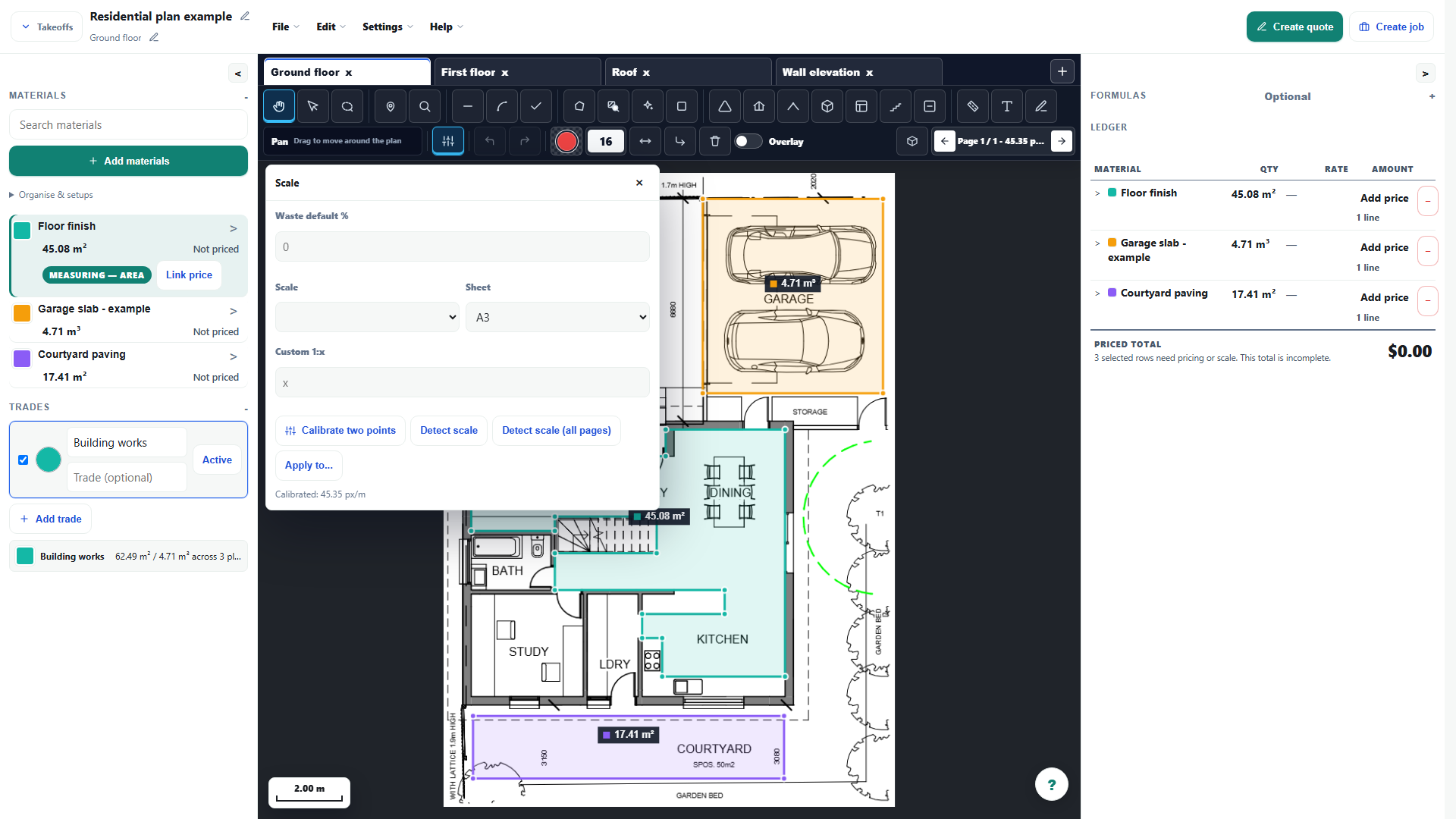
- Choose Detect scale (all pages) to scan the drawing and title block for a proposed scale on each page.
- Review the units and ratio on every page before using them; pages in the same PDF can have different scales.
- If a page's scale is missing or wrong, choose Calibrate two points, click the two ends of a printed dimension, then enter its real length and unit.
- Measure another known dimension as a check before completing the rest of the takeoff.
Worked example
Trace a known wall dimension, enter its actual length and unit, then measure a second labelled span. If both agree, continue with the garage or courtyard measurement on that page.
This is an illustrative scenario. Use your own approved scope, quantities, rates and business rules.
Check the result
Check at least two known dimensions in different parts of the drawing. Revisit calibration after replacing or cropping a page, and confirm the unit shown in the ledger.
Limits and troubleshooting
Automatic scale detection is a starting point to check, not a guarantee. A cropped excerpt is not the original A3 or A1 sheet; applying the original paper-size preset can produce incorrect quantities.
Open the complete takeoff walkthrough with volume, formula, assembly and overlay examples
Check current plans and feature availability · Browse every guide