Pattern Search: sample, review and confirm
Samples a hatch, colour or texture and finds matching regions across the takeoff for review before anything is added.
Use Pattern Search when a drawing repeats a hatch, colour or texture that represents a finish or material across several regions.
Before you start
Availability: Business plan and above. Enabled business features, role permissions, connected providers and supported devices may add requirements.
Documented roles: Owner, Office. A role name alone does not override the permissions set by your business.
Where to find it: Takeoffs > Pattern Search.
Choose a clear sample that represents the intended material and avoids surrounding labels, borders and unrelated marks. Calibrate pages before relying on measured results.
Using this guide in United States
- Set your business country in Business settings before entering customer addresses or preparing documents. The country selected on the public website does not change an existing business.
- Check the business currency (USD), time zone and document tax settings. Only enable tax collection if your business is registered and the settings match your requirements. Your customer invoice tax settings are separate from tax on your AllQuote subscription.
- Screenshots use demonstration records. Their sample currency, addresses and tax amounts do not override your business settings.
- Check the drawing units, calibrate against a known dimension and confirm the ledger unit before applying a material rate. An address or website country does not convert a drawing, assembly quantity or supplier rate. For volume, use consistent area and depth units before checking the cubic quantity.
Step by step
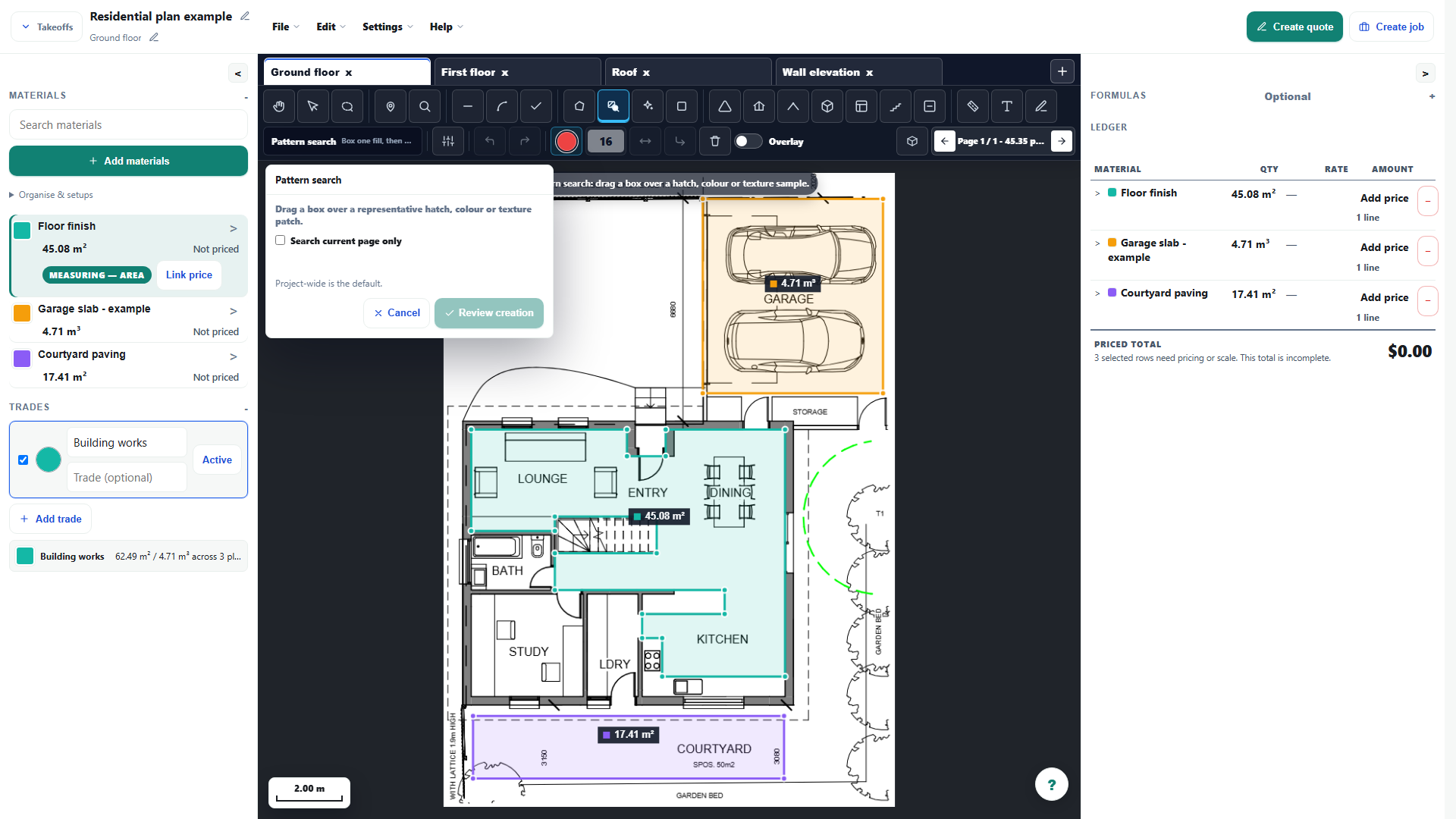
- Choose Pattern Search and draw a tight sample around the hatch, colour or texture you want to find.
- Let the search run across the takeoff; there are no detection settings to tune.
- Choose Review creation to build the review set, then reject anything that is not the sampled finish or material.
- Choose Confirm create areas to add the reviewed matches. Cancelling leaves the plan unchanged.
Worked example
For a repeated floor-finish hatch, draw a tight sample, run the search and open Review creation. Reject a matching graphic in a legend or unrelated area before confirming the accepted regions.
This is an illustrative scenario. Use your own approved scope, quantities, rates and business rules.
Check the result
Compare every accepted region with the original plan and material legend. Check overlaps, openings and missed areas before using the ledger quantity in pricing.
Limits and troubleshooting
The screenshot shows setup, not a proven detection result. Similar-looking graphics can represent different things. There are no detection settings to tune; cancel or use manual measurement if the review is unsuitable.
Open the complete takeoff walkthrough with volume, formula, assembly and overlay examples
Check current plans and feature availability · Browse every guide