Lasso selection and pitch or depth
Lasso selects several existing mark-ups together; Pitched area and Volume separately ask for pitch or depth as you measure.
Use Volume for depth-based quantities such as slabs or excavation, Pitched area for sloping surfaces, and Lasso when selecting several existing mark-ups.
Before you start
Availability: Business plan and above. Enabled business features, role permissions, connected providers and supported devices may add requirements.
Documented roles: Owner, Office. A role name alone does not override the permissions set by your business.
Where to find it: Takeoffs > Lasso and measurements.
Calibrate the drawing, identify the area boundary and obtain the specified depth or roof pitch. Convert millimetres to metres when the depth control expects metres.
Using this guide in United States
- Set your business country in Business settings before entering customer addresses or preparing documents. The country selected on the public website does not change an existing business.
- Check the business currency (USD), time zone and document tax settings. Only enable tax collection if your business is registered and the settings match your requirements. Your customer invoice tax settings are separate from tax on your AllQuote subscription.
- Screenshots use demonstration records. Their sample currency, addresses and tax amounts do not override your business settings.
- Check the drawing units, calibrate against a known dimension and confirm the ledger unit before applying a material rate. An address or website country does not convert a drawing, assembly quantity or supplier rate. For volume, use consistent area and depth units before checking the cubic quantity.
Step by step
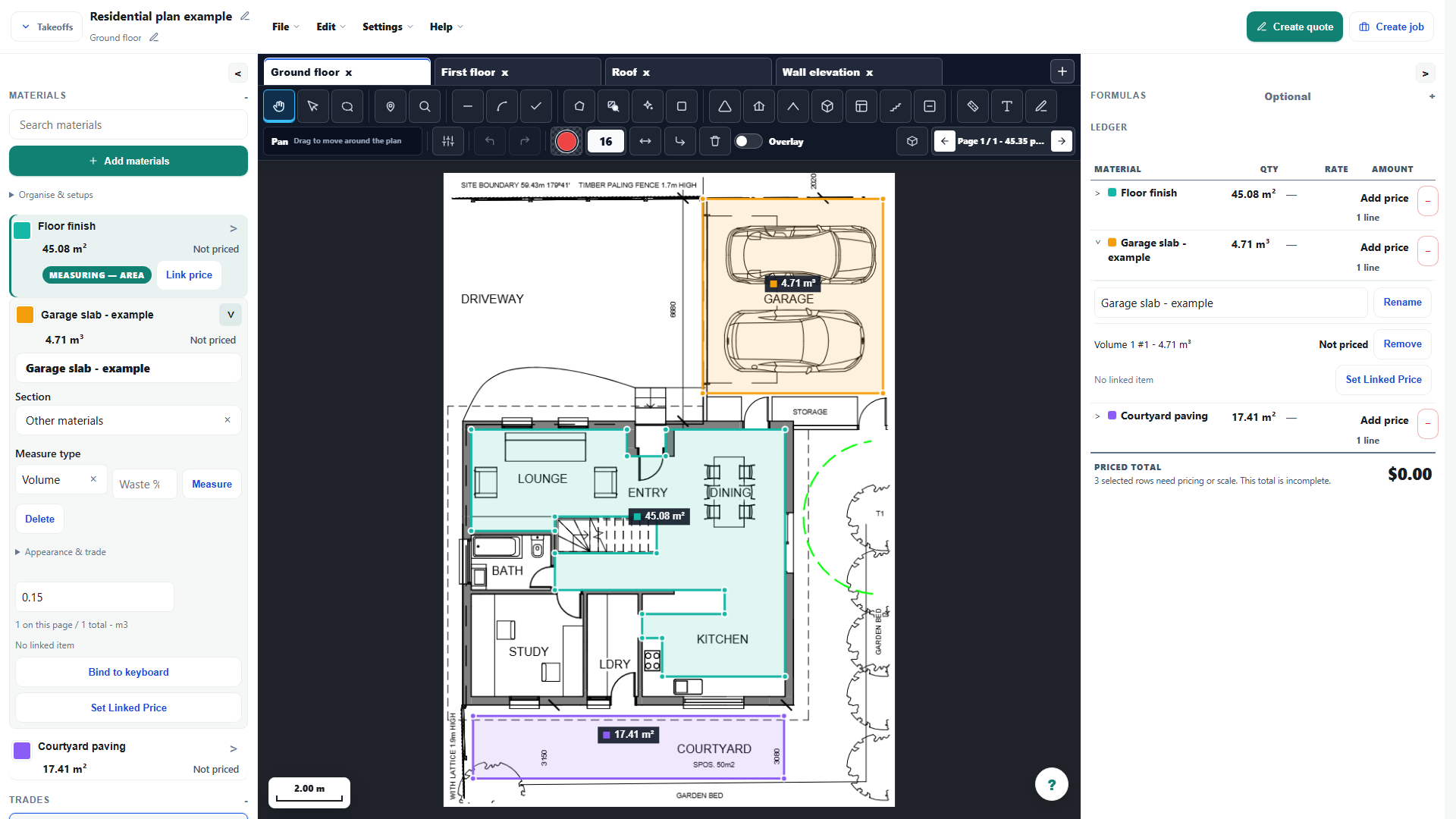
- Choose Lasso and draw around the existing mark-ups you want to select together.
- Use the selection actions to move or delete the selected mark-ups together, then clear the selection.
- For a new roof face choose Pitched area and enter the requested pitch; for a volume choose Volume and enter the requested depth.
- Review the calculated area or volume in the ledger. Lasso selection does not set pitch or depth for a batch.
Worked example
The garage teaching example uses approximately 31.42 m² at an illustrative 0.15 m depth: 31.42 × 0.15 = 4.713 m³, displayed at about 4.71 m³. A different specified depth changes the required volume.
This is an illustrative scenario. Use your own approved scope, quantities, rates and business rules.
Check the result
Check the footprint, depth unit, deductions and resulting cubic quantity. Keep separate materials or layers as distinct quantities where their depths differ.
Limits and troubleshooting
Lasso selects existing geometry; it does not assign one pitch or depth to a batch. The example depth is not a construction specification from the plan, and waste or ordering allowances need separate review.
Open the complete takeoff walkthrough with volume, formula, assembly and overlay examples
Check current plans and feature availability · Browse every guide