Equipment service dates and usage meters
AllQuote’s equipment service loop records service intervals, due dates, supported usage meters and service history. The service tracker distinguishes a due date from a booked appointment.
Published by AllQuote. Product information reviewed 18 October 2026. Examples use demonstration scenarios, not customer testimonials or promised results.
Can I track when equipment is due for service and when it is booked?
AllQuote’s equipment service loop records service intervals, due dates, supported usage meters and service history. The service tracker distinguishes a due date from a booked appointment.
- Plans
- Team, Business and Enterprise for the equipment service loop. Maintenance contracts and SLA depth require Business or Enterprise.
- Platform and access
- Web Equipment register and service tracker, subject to equipment permissions and enabled features. Check supported mobile tasks separately.
How the workflow fits together
Set the schedule
Record the equipment, last service and date or supported usage-meter interval.
Book service
Record the appointment date without treating it as completed maintenance.
Review service history
Record completed work and check the resulting next due position and history.
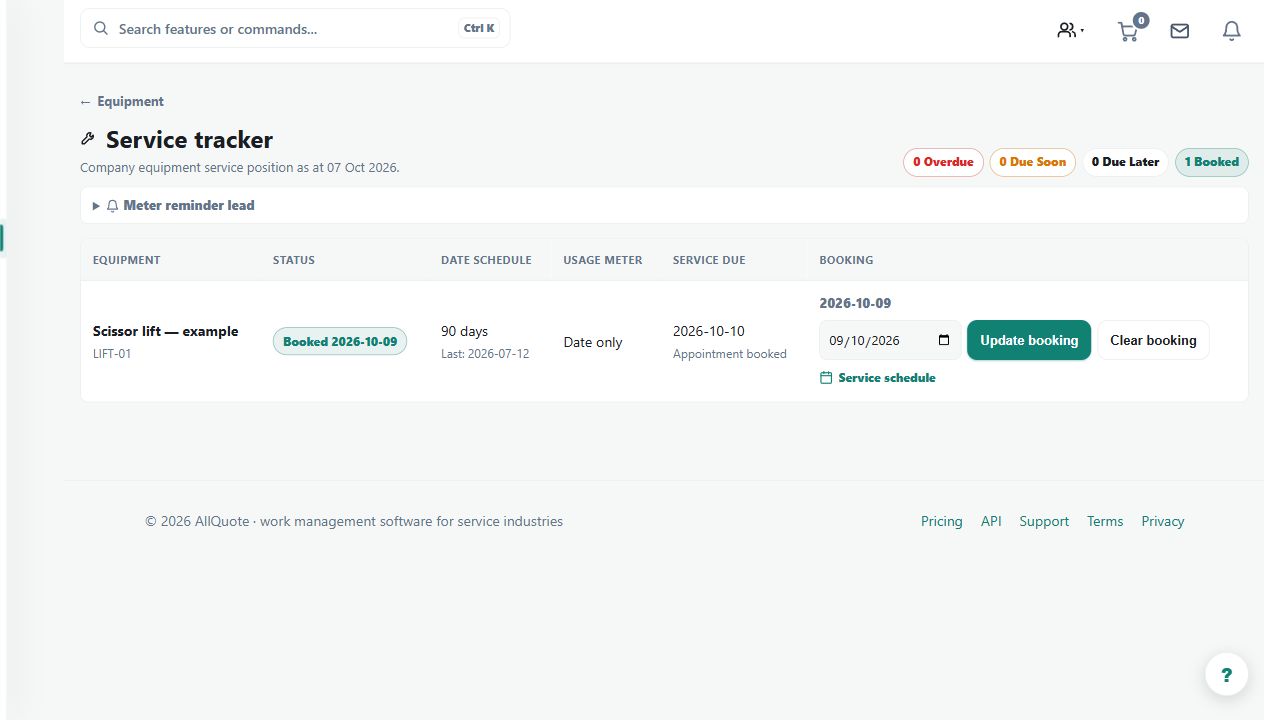
A worked example
Illustrative booking: service is due on 15 July and a mechanic is booked for 14 July. Keep both dates; the booking does not mean the service has already happened.
Requirements and limits
Service records do not certify that equipment is safe to operate. Manufacturer requirements and inspection obligations still apply. A recorded appointment does not contact or confirm a booking with a mechanic.
Plan access does not replace user permissions. Check local availability, enabled features and connected services for your business in Canada.
What to check in a demonstration
Set a sample due date, add and change the booked date, then inspect the service history and due status. If you use meters, test the relevant unit and interval.