Business Planner
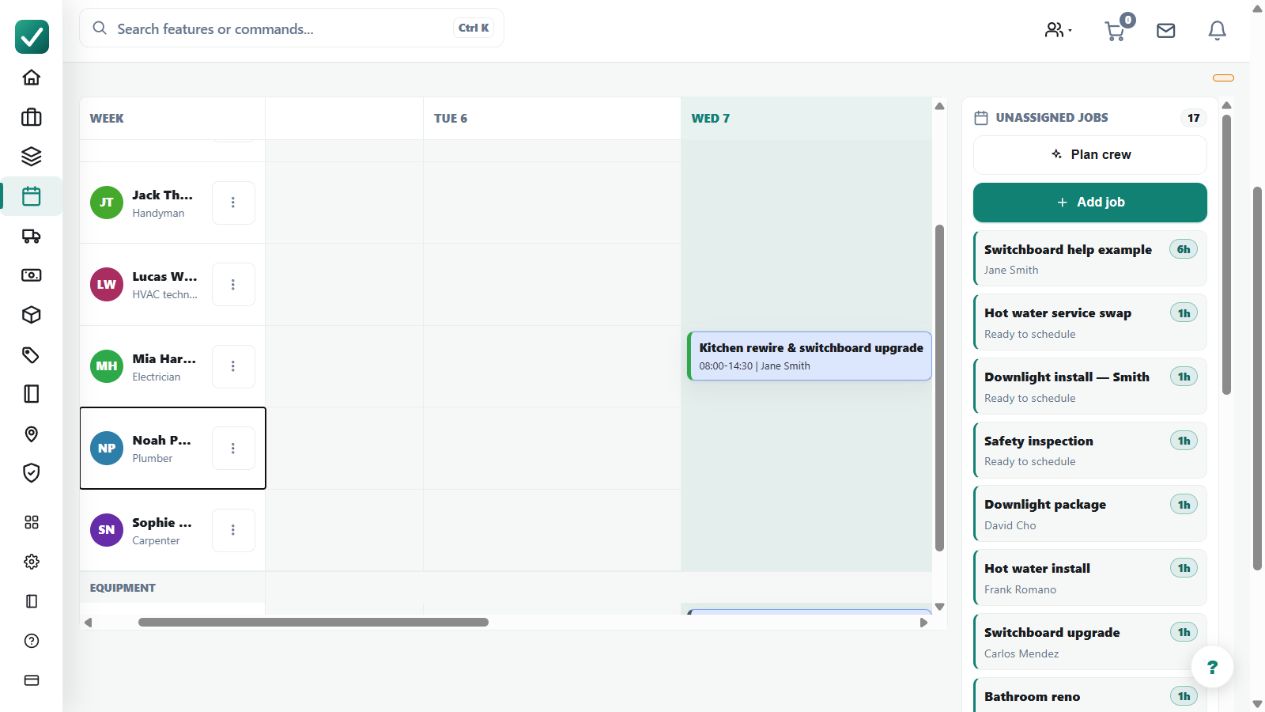
Schedules the day by dragging crew and equipment onto jobs in a snapshot or calendar view.
Use the planner to coordinate job assignments, people and equipment for the selected day.
Before you start
Availability: Team plan and above. Enabled business features, role permissions, connected providers and supported devices may add requirements.
Documented roles: Owner, Office. A role name alone does not override the permissions set by your business.
Where to find it: Work > Business Planner.
Keep job dates, crew availability and equipment records current. Identify unassigned work before filling the day.
Using this guide in New Zealand
- Set your business country in Business settings before entering customer addresses or preparing documents. The country selected on the public website does not change an existing business.
- Check the business currency (NZD), time zone and document tax settings. Only enable tax collection if your business is registered and the settings match your requirements. Your customer invoice tax settings are separate from tax on your AllQuote subscription.
- Screenshots use demonstration records. Their sample currency, addresses and tax amounts do not override your business settings.
Step by step
- Open Business Planner from the sidebar or go to /dispatch.
- Pick the date or snapshot you are planning.
- Review unassigned jobs, available crew, and available equipment.
- Drag crew or equipment onto jobs, then adjust assignments as the day changes.
Worked example
For a commercial installation, allocate the required crew and machine to the job, then review another urgent visit before moving an already-assigned worker.
This is an illustrative scenario. Use your own approved scope, quantities, rates and business rules.
Check the result
Inspect the selected date, each assignment and the remaining unassigned work. Confirm the job record reflects the intended crew and equipment.
Limits and troubleshooting
A drag action is a scheduling change, not a confirmation that people have arrived or equipment is ready. Review availability, travel and any job prerequisites.
Follow the screenshot tutorial: Schedule and dispatch a job
Check current plans and feature availability · Browse every guide