Restock and auto-replenish lists
Finds items below their per-location minimum and suggests transfers or reorder actions to top a location back up.
Use restock suggestions to identify a location below its minimum and choose between moving existing stock and arranging a reorder.
Before you start
Availability: Enterprise plan and above. Enabled business features, role permissions, connected providers and supported devices may add requirements.
Documented roles: Owner, Office, Team. A role name alone does not override the permissions set by your business.
Where to find it: Stock > Restock > Auto-replenish.
Set item reorder levels and per-location minimums, and keep recorded location balances current.
Using this guide in Canada
- Set your business country in Business settings before entering customer addresses or preparing documents. The country selected on the public website does not change an existing business.
- Check the business currency (CAD), time zone and document tax settings. Only enable tax collection if your business is registered and the settings match your requirements. Your customer invoice tax settings are separate from tax on your AllQuote subscription.
- Screenshots use demonstration records. Their sample currency, addresses and tax amounts do not override your business settings.
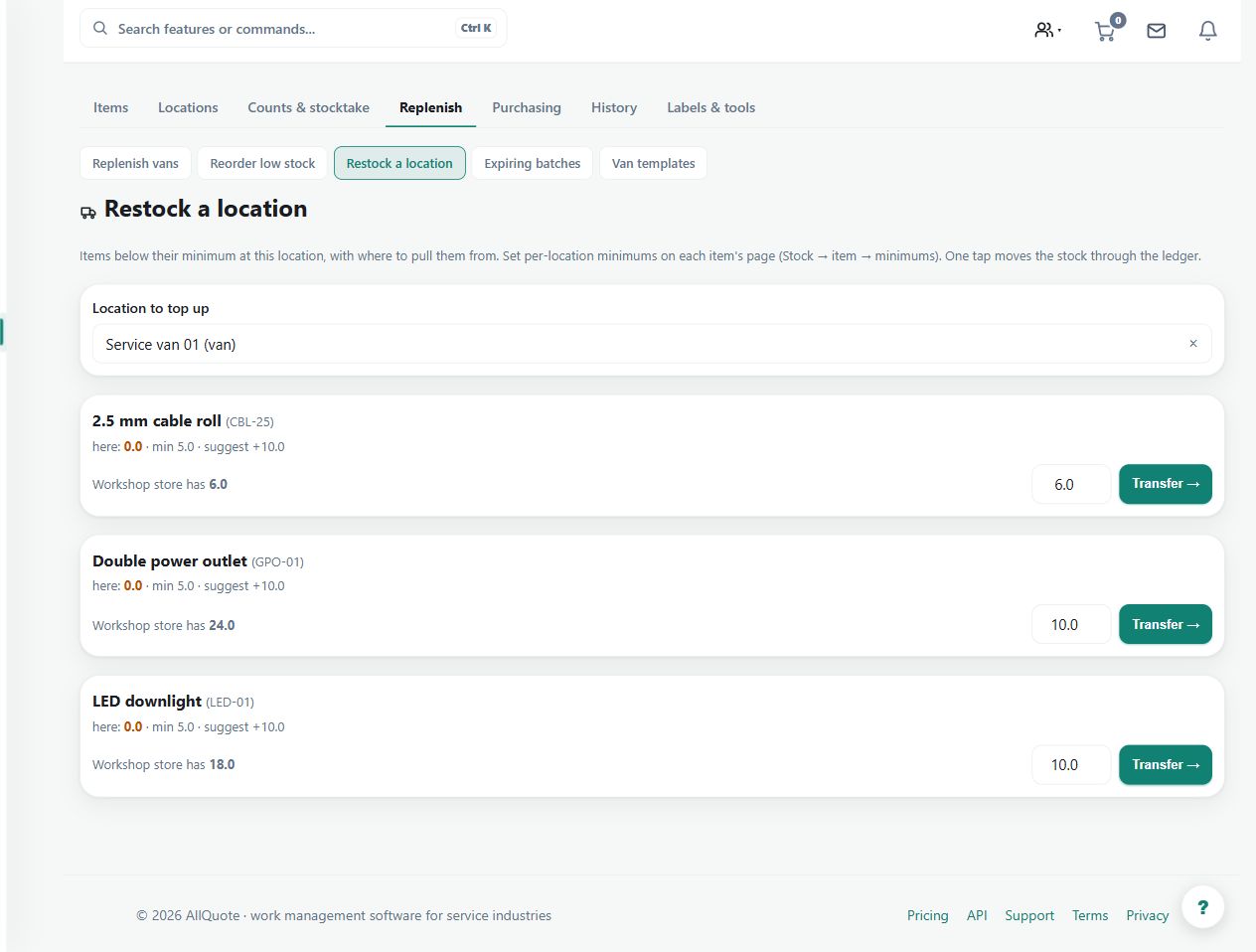
Step by step
- Open Stock, then open an item and set reorder levels and per-location minimums where needed.
- Open Stock > Restock or go to /stock/restock.
- Choose the Location to top up.
- For each low item, use Transfer -> to move available stock from another location, or Reorder -> when there is no source stock.
Worked example
A van is below its fitting minimum while the warehouse has stock. Select the van in Restock, inspect the suggested source and quantity, and choose the appropriate transfer action.
This is an illustrative scenario. Use your own approved scope, quantities, rates and business rules.
Check the result
Check both source and destination balances and confirm the van's intended target level after the movement.
Limits and troubleshooting
A suggestion does not prove stock is physically available or place an approved supplier order by itself. Review reservations, pack sizes and the actual movement.
Follow the screenshot tutorial: Order from a supplier
Check current plans and feature availability · Browse every guide