Zapier private integration
Connects AllQuote to other apps through the private AllQuote Zapier integration, for Team, Business and Enterprise businesses.
Use the private Zapier integration to start Zaps from AllQuote events or to create and update AllQuote records from other apps without copying an API key.
Before you start
Availability: Plan and role requirements vary. Enabled business features, role permissions, connected providers and supported devices may add requirements.
Documented roles: Owner. A role name alone does not override the permissions set by your business.
Where to find it: Settings > Business Settings > Connections > Zapier & API.
Zapier access needs an active Team, Business or Enterprise plan with Connected apps and API switched on in Business settings. Only the business owner can approve the connection, and the owner's email must be confirmed. The AllQuote mobile app does not configure Zapier; use the website on a computer or in a phone browser. Your Zapier plan and task usage are separate from AllQuote.
Using this guide in New Zealand
- Set your business country in Business settings before entering customer addresses or preparing documents. The country selected on the public website does not change an existing business.
- Check the business currency (NZD), time zone and document tax settings. Only enable tax collection if your business is registered and the settings match your requirements. Your customer invoice tax settings are separate from tax on your AllQuote subscription.
- Screenshots use demonstration records. Their sample currency, addresses and tax amounts do not override your business settings.
Step by step
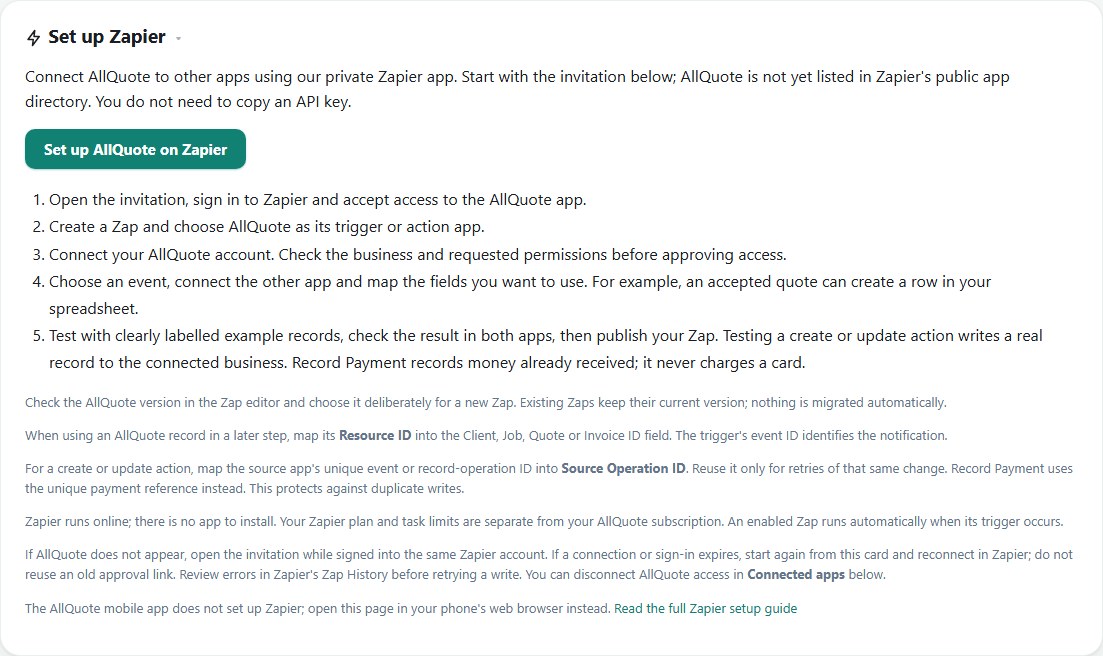
- Sign in on the web as the business owner and open Settings > Business settings > Connections > Zapier & API.
- Use Set up AllQuote on Zapier, accept the private invitation and create a Zap with AllQuote as the trigger or action app.
- Check the AllQuote version in the Zap editor, connect your existing AllQuote account and approve the items Zapier may use.
- Map Resource ID into record ID fields and a unique Source Operation ID into create or update actions.
- Test with a clearly labelled example, because actions write real records, then review the result and turn on your Zap.
Worked example
An owner builds a Zap that adds a spreadsheet row when a quote is accepted. They choose the AllQuote version deliberately in the Zap editor, map the quote's Resource ID, test it with a clearly labelled example and turn the Zap on only after checking the row and the AllQuote record.
This is an illustrative scenario. Use your own approved scope, quantities, rates and business rules.
Check the result
Check each test result in AllQuote and in Zapier's Zap History before turning the Zap on. Record Payment records money already received and never charges a card, so confirm the payment amount, currency and reference against the real receipt.
Limits and troubleshooting
Existing Zaps keep their current AllQuote version and are never migrated automatically. Some triggers are best-effort and can be missed during an outage. Quote and invoice actions create drafts that you still review and send in AllQuote. If a connection or sign-in expires, start again from Settings rather than reusing an old link.
Using the mobile app
The screenshots above show the web interface. These guides explain the separate native app screens and their limits.
Check current plans and feature availability · Browse every guide