Reece NZ account linking and read previews
Explains how a New Zealand business owner links a Reece NZ account on the allquote.net website and, where enabled, previews products, account prices and branches. It does not place supplier orders or sync invoices or accounting.
Use this guide when a New Zealand business wants to check its own Reece NZ products, account prices and branches in AllQuote while it continues to order and settle invoices with Reece directly.
Before you start
Availability: Team plan and above, for the owner of a New Zealand business. Enabled business features, role permissions, connected providers and supported devices may add requirements.
Documented roles: Owner. A role name alone does not override the permissions set by your business.
Where to find it: Settings > Business Settings > Connections > Reece NZ account linking.
Only the current business owner can link the account. Business settings must show New Zealand as the business country, and the plan must include stock and purchase orders. Use the allquote.net website on a computer or in a phone browser; sign-ins are not shared between website domains, so sign in on allquote.net even if you usually use another AllQuote address. The AllQuote mobile app does not link Reece NZ or show these previews. Use the allquote.net website in your phone browser instead. You approve the connection in Reece maX, so have your maX sign-in ready; you do not enter Reece passwords or keys in AllQuote.
Using this guide in New Zealand
- Choose your business country when creating a new account. For an existing business, check the country in Business settings before entering addresses or preparing documents. Some country changes are unavailable for existing businesses, even when new accounts can sign up in that country. Changing the public website region does not change your business settings.
- Check the business currency (NZD), time zone and document tax settings. Only enable tax collection if your business is registered and the settings match your requirements. Your customer invoice tax settings are separate from tax on your AllQuote subscription.
- Screenshots use demonstration records. Their sample currency, addresses and tax amounts do not override your business settings.
- This guide covers the separate New Zealand connection only. Australian Reece pricebook sync, ordering and invoice sync guides do not apply to New Zealand businesses.
Current availability in New Zealand
- Account linking: Available. The business owner links the Reece NZ account from Settings on the allquote.net website.
- Product search, account prices and branches: Available. After linking, the owner can preview them read-only.
- Reusable pricebook import from selected price rows: Available. The owner reviews selected account-price rows and confirms the import; nothing is imported automatically.
- Supplier invoice viewing: Available. The owner can search, view and download supplier invoices. Viewing does not create supplier bills or accounting entries.
- Hosted cart preview (PunchOut): Available. The owner can review a cart returned from Reece and choose rows to view. It does not submit an order.
- Supplier orders and purchasing: Not provided for New Zealand. AllQuote does not submit Reece orders for NZ businesses, and Australian ordering instructions do not apply.
- Automatic invoice sync and accounting: Not provided. Previews and invoice viewing never create supplier bills, job costs or accounting entries.
Step by step
- Sign in to the allquote.net website as the business owner, on a computer or in a phone browser. Business settings must show New Zealand as the business country.
- Open Settings > Business settings > Connections and choose Reece NZ account linking under Supplier integrations.
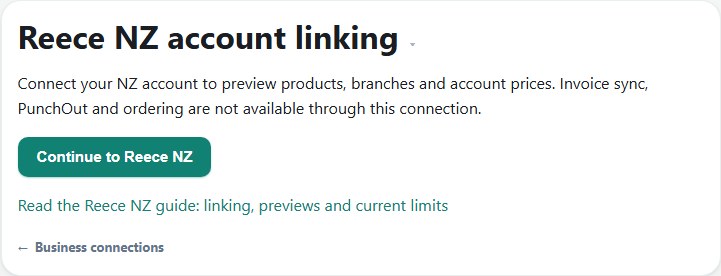
- Choose Continue to Reece NZ, select the account in Reece maX and approve the connection. Reece returns you to the NZ connection page in AllQuote.
- Where read previews are enabled, choose Browse NZ products, account prices and branches, then search products, enter a product or price-file code, or view branches.
- Read the NZD amounts and GST figures exactly as Reece supplied them. Previews do not order, import or sync anything.
- To stop using the link, choose Remove link from AllQuote, then manage any remaining consent in Reece maX.
Worked example
An owner signs in on allquote.net, opens the Reece NZ tile in Connections, approves their trade account in Reece maX and returns to AllQuote. Where previews are enabled, they search for a fitting, enter its price-file code to see the account price in NZD with the GST-exclusive and GST-inclusive amounts Reece supplied, check a nearby branch, and then place the order with Reece directly.
This is an illustrative scenario. Use your own approved scope, quantities, rates and business rules.
Check the result
After returning from Reece, check that the NZ connection page shows a saved connection. In the previews, confirm the account name, customer number and home branch, then compare a known item's price with Reece maX before relying on it. Amounts are NZD and GST figures appear only as Reece supplied them; a missing price shows as unavailable rather than estimated, and your own document tax settings do not change supplier prices.
Limits and troubleshooting
Previews are read-only and do not confirm stock availability. AllQuote does not submit Reece orders for New Zealand businesses, and it does not create supplier bills, job costs or accounting entries from Reece NZ data. Reusable pricebook import, supplier invoice viewing and the hosted cart preview each have a separate switch; Current availability on this page shows which are enabled now. Removing the link in AllQuote does not revoke consent in Reece maX. If the business owner, plan, country or connection configuration changes, previews stop and the current owner may need to link again.
Check current plans and feature availability · Browse every guide