Licence approvals
Lets approved managers review self-lodged worker licences and credentials before they count for compliance checks.
Use the approval queue to assess worker-submitted credentials before they count in the supported compliance checks.
Before you start
Availability: Enterprise plan and above. Enabled business features, role permissions, connected providers and supported devices may add requirements.
Documented roles: Owner, Office. A role name alone does not override the permissions set by your business.
Where to find it: Compliance > Compliance Hub > Licence approvals.
Make sure the reviewer has the appropriate management access and can inspect the uploaded evidence.
Using this guide in Canada
- Set your business country in Business settings before entering customer addresses or preparing documents. The country selected on the public website does not change an existing business.
- Check the business currency (CAD), time zone and document tax settings. Only enable tax collection if your business is registered and the settings match your requirements. Your customer invoice tax settings are separate from tax on your AllQuote subscription.
- Screenshots use demonstration records. Their sample currency, addresses and tax amounts do not override your business settings.
- Use forms, licence types and sign-off requirements approved for your country and the specific contract. Australian demonstration forms and SWMS terminology are examples, not certification that a document meets local law. Check the completed document and approval record before relying on it for site access.
Step by step
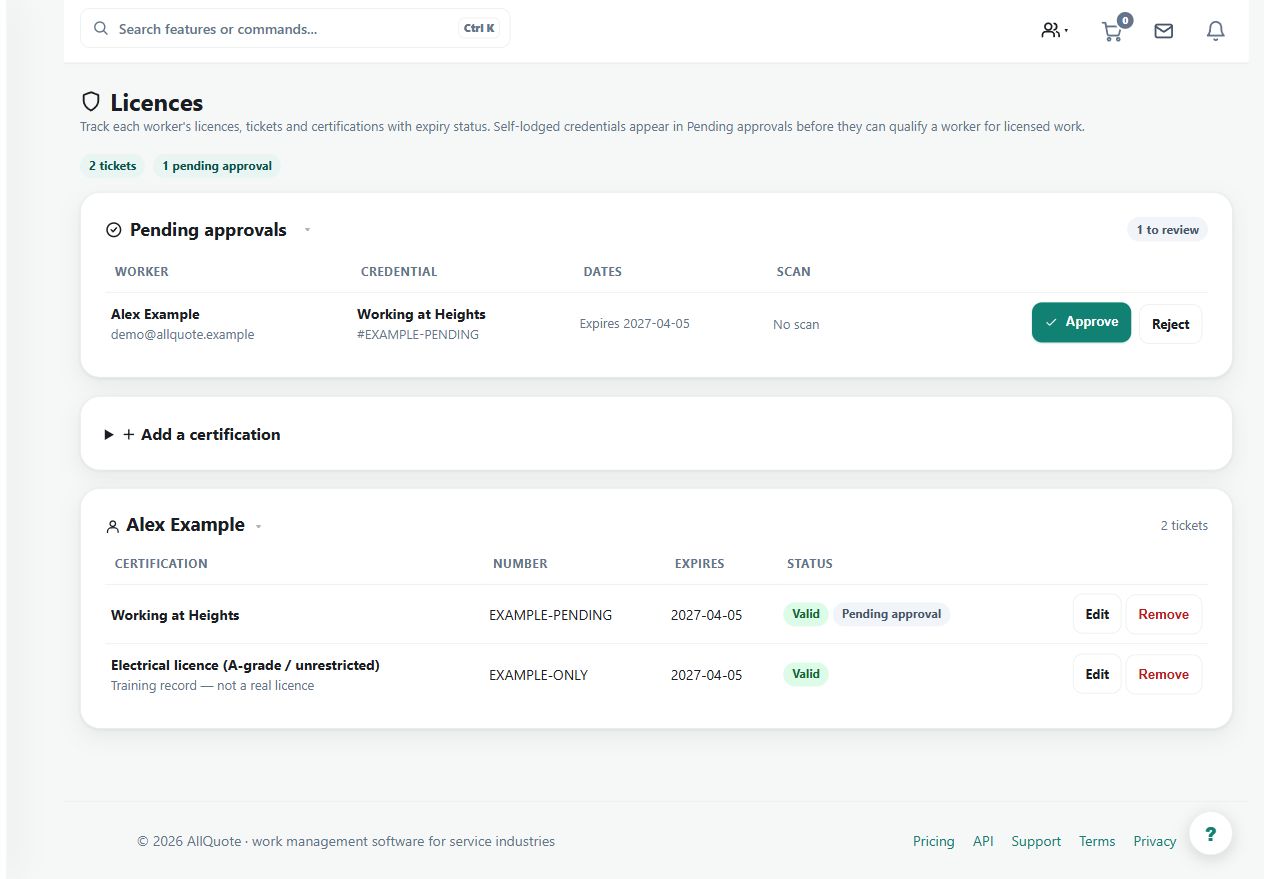
- Open Compliance hub > Licence approvals.
- Review pending worker credentials and open the uploaded scan when evidence needs checking.
- Approve credentials that are valid for the business, or reject them with a reason the worker can fix.
- Approved credentials then count in licence-holder lists and task assignment checks.
Worked example
Open a pending credential, compare its holder and expiry with the evidence, and either approve it or reject it with a useful correction reason.
This is an illustrative scenario. Use your own approved scope, quantities, rates and business rules.
Check the result
Confirm that the resulting status matches the decision and that approved credentials appear where assignment checks expect them.
Limits and troubleshooting
Do not approve an unreadable or ambiguous upload solely to clear the queue. A stored approval is the business's recorded decision, not independent issuer verification.
Check current plans and feature availability · Browse every guide