Site and customer assets
Tracks customer equipment, photos, site placement, and linked jobs in an asset register.
Use the customer asset register for installed equipment whose identity, location and service history matter across multiple jobs.
Before you start
Availability: Business plan and above. Enabled business features, role permissions, connected providers and supported devices may add requirements.
Documented roles: Owner, Office. A role name alone does not override the permissions set by your business.
Where to find it: Work > Assets > Site assets.
Record the correct customer, installed site address, model and serial number. Separate customer equipment from company-owned operational gear.
Using this guide in Canada
- Set your business country in Business settings before entering customer addresses or preparing documents. The country selected on the public website does not change an existing business.
- Check the business currency (CAD), time zone and document tax settings. Only enable tax collection if your business is registered and the settings match your requirements. Your customer invoice tax settings are separate from tax on your AllQuote subscription.
- Screenshots use demonstration records. Their sample currency, addresses and tax amounts do not override your business settings.
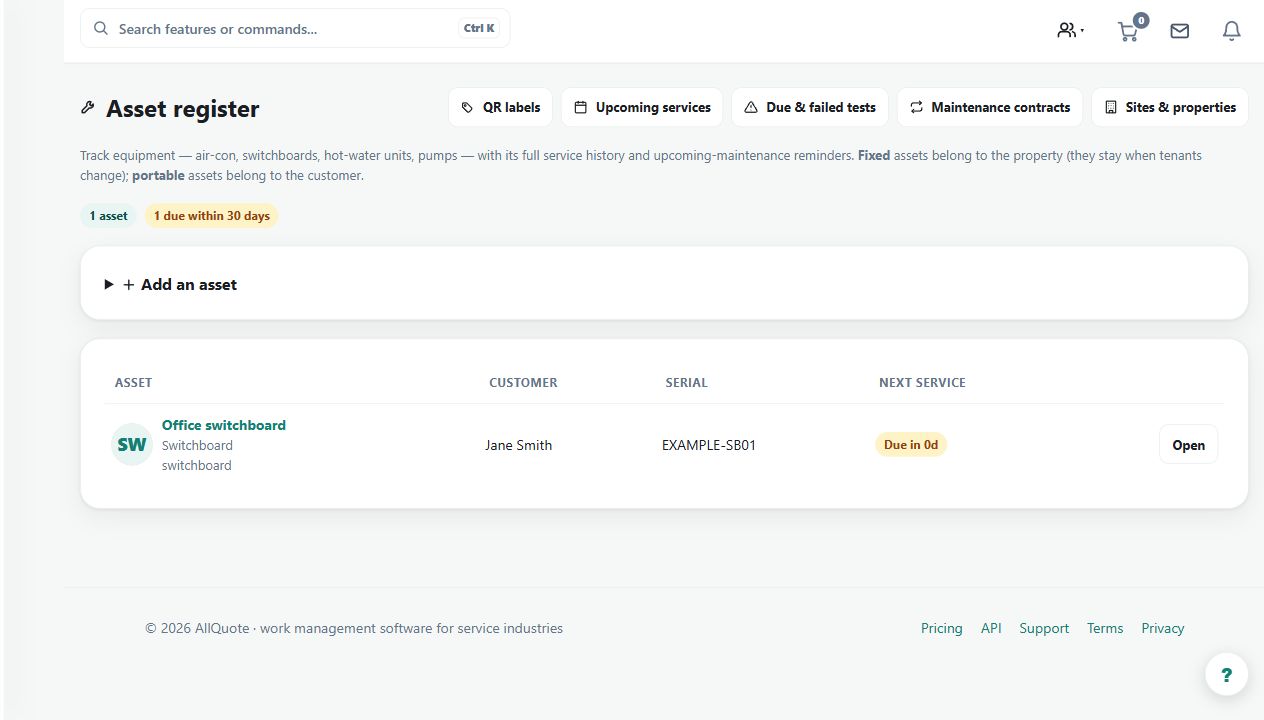
Step by step
- Open sidebar Work > Assets or go to /assets.
- Use Add an asset and enter Name, Asset type, Model number, Serial #, Customer, Site address, Install date, and Notes.
- Use Site address for where the asset is fitted; jobs created for the asset auto-populate that site address.
- Open the asset and use Details to edit fields, or press Create a job for this asset to start linked work.
- Use Photos & documents > Upload for files that belong with the asset.
Worked example
Register a customer's pump, attach its photos and documents, then create a linked service job from the asset so the site address follows the work.
This is an illustrative scenario. Use your own approved scope, quantities, rates and business rules.
Check the result
Check the linked job, customer and asset identity, and inspect the service evidence attached to the right record.
Limits and troubleshooting
A serial number or photograph should be verified against the physical asset. Avoid creating duplicate records that split the history of the same item.
Check current plans and feature availability · Browse every guide