Progress payments
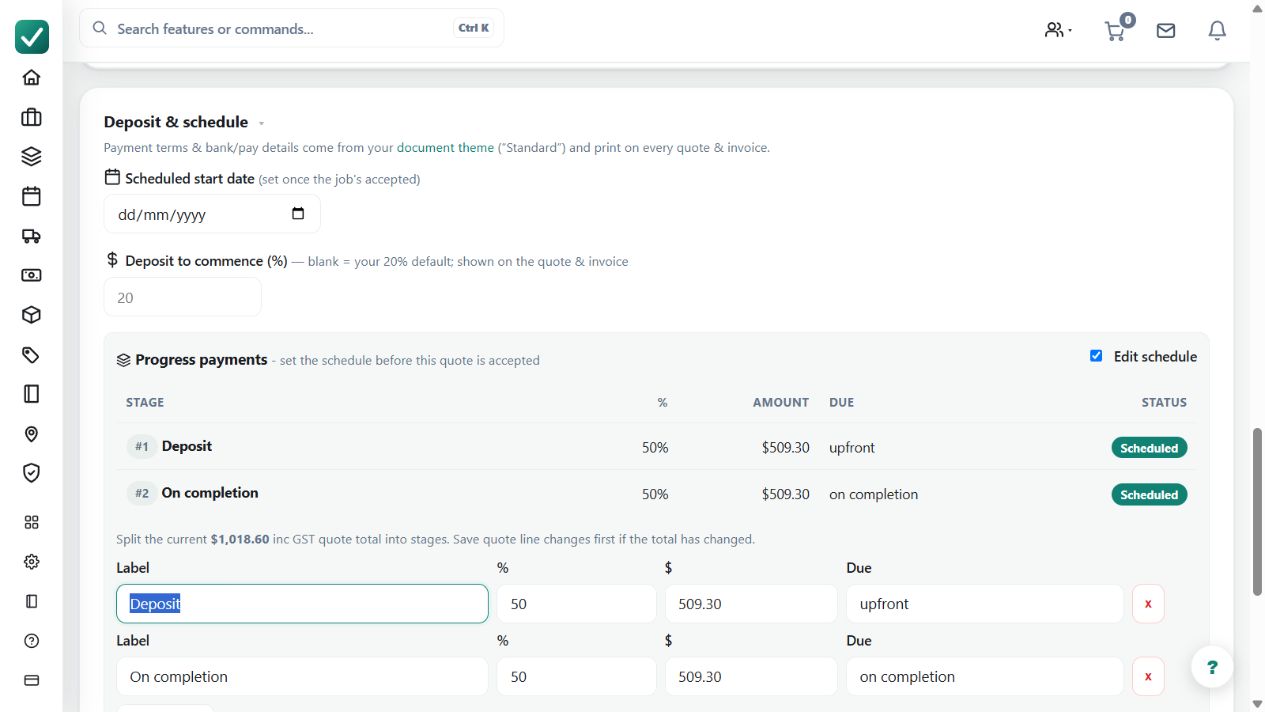
Splits accepted work into payment stages so invoices can be raised as milestones are reached.
Use staged payments when agreed milestones divide an accepted job into separately invoiced portions.
Before you start
Availability: Free plan and above. Enabled business features, role permissions, connected providers and supported devices may add requirements.
Documented roles: Owner, Office. A role name alone does not override the permissions set by your business.
Where to find it: Invoices > Stages > Progress payments.
Agree the milestone descriptions and amounts before invoicing begins. Check the accepted scope, deposits and any already-issued invoices.
Using this guide in United Kingdom
- Set your business country in Business settings before entering customer addresses or preparing documents. The country selected on the public website does not change an existing business.
- Check the business currency (GBP), time zone and document tax settings. Only enable tax collection if your business is registered and the settings match your requirements. Your customer invoice tax settings are separate from tax on your AllQuote subscription.
- Screenshots use demonstration records. Their sample currency, addresses and tax amounts do not override your business settings.
Step by step
- Open the accepted quote or its linked job.
- Set up the payment stages/milestones before invoicing begins.
- When a milestone is reached, raise the matching stage invoice from the job or invoice screen.
- Track the stage invoice in Invoices at /invoices until it is sent, paid, or reconciled.
Worked example
An installation contract has a mobilisation stage, equipment delivery stage and completion stage. Raise the appropriate invoice when each milestone is reached and track its payment separately.
This is an illustrative scenario. Use your own approved scope, quantities, rates and business rules.
Check the result
Reconcile stage totals to the agreed work and check each issued invoice and balance. Use the linked job to see the overall payment position.
Limits and troubleshooting
Progress-payment milestones differ from cumulative progress claims. Choose the appropriate workflow for the agreement, and do not rewrite an issued stage merely to hide a later correction.
Follow the screenshot tutorial: Take a payment
Check current plans and feature availability · Browse every guide