Reusable assemblies and kits
Stores reusable bundles of labour and materials that can be used to price repeated work from current cost assumptions.
Use assemblies to build repeatable estimates from a defined bundle of labour and materials, including commercial work packages.
Before you start
Availability: Free plan and above. Enabled business features, role permissions, connected providers and supported devices may add requirements.
Documented roles: Owner, Office. A role name alone does not override the permissions set by your business.
Where to find it: Apps > Assemblies & Kits.
Define the unit the kit represents and the component quantities per unit. Review current pricebook costs, labour rates and any required licence.
Using this guide in New Zealand
- Set your business country in Business settings before entering customer addresses or preparing documents. The country selected on the public website does not change an existing business.
- Check the business currency (NZD), time zone and document tax settings. Only enable tax collection if your business is registered and the settings match your requirements. Your customer invoice tax settings are separate from tax on your AllQuote subscription.
- Screenshots use demonstration records. Their sample currency, addresses and tax amounts do not override your business settings.
- Check the drawing units, calibrate against a known dimension and confirm the ledger unit before applying a material rate. An address or website country does not convert a drawing, assembly quantity or supplier rate. For volume, use consistent area and depth units before checking the cubic quantity.
Step by step
- Open Apps > Assemblies & Kits or go to /kits.
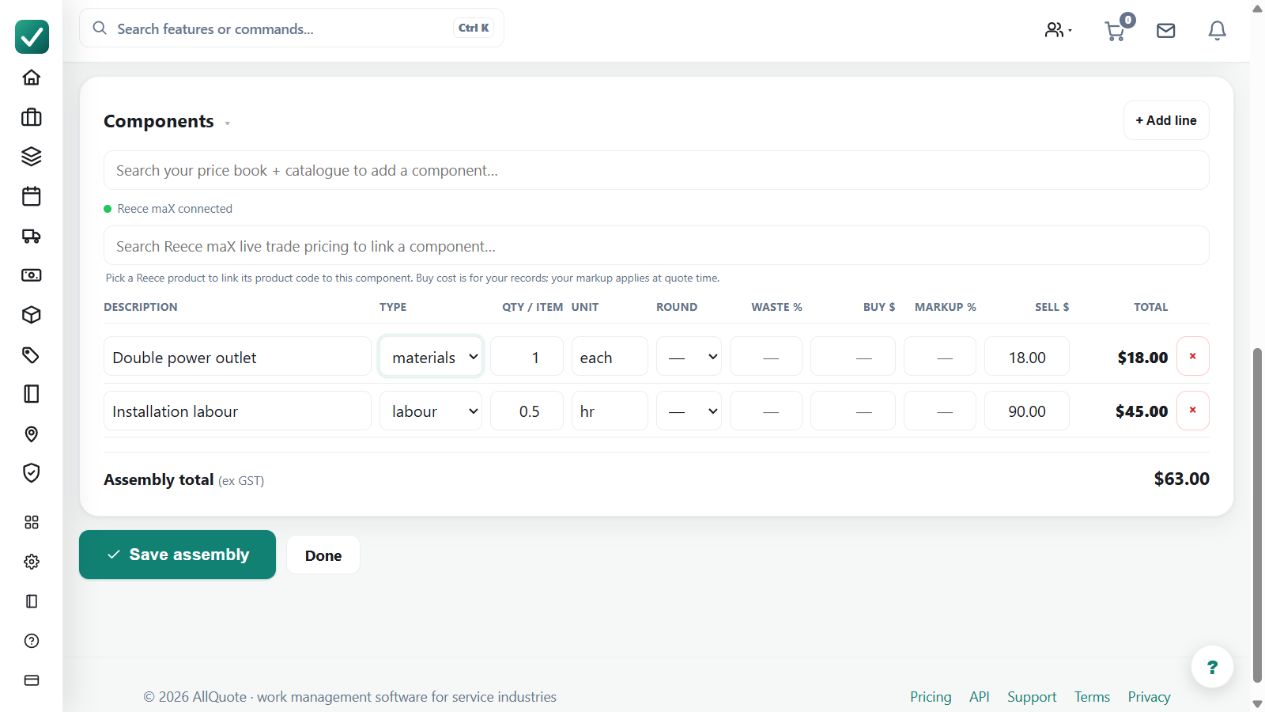
- Use New assembly, enter the name, description, and optional required licence, then press Create & add components.
- Add materials, labour, and other reusable component lines from the price book or free text.
- Open a quote and use Add assembly/kit so the current component prices expand into quote line items.
- To reuse work already priced on a quote, tick quote line items and press Create assembly/kit.
- Use Business settings > Documents to choose whether customer documents show the kit breakdown or one collapsed line.
Worked example
The guide's illustrative per-m² tiling kit has 11 tiles at $4, 0.25 adhesive bags at $32 and 0.5 labour hours at $80: $92 per m² before other allowances and tax.
This is an illustrative scenario. Use your own approved scope, quantities, rates and business rules.
Check the result
Expand the inserted kit in a quote and inspect each quantity, rate and unit. Compare the customer PDF with the chosen breakdown setting.
Limits and troubleshooting
Assemblies are available from Free, subject to permissions. Reusing a kit does not guarantee current supplier pricing or engineering suitability; validate coverage, waste and labour assumptions.
Check current plans and feature availability · Browse every guide