Worker certifications and licences
Stores worker tickets, licences, expiry dates, status, documents, and reminders for crew compliance review.
Use the licence register to keep worker credentials, supporting documents and expiry information available for review.
Before you start
Availability: Enterprise plan and above. Enabled business features, role permissions, connected providers and supported devices may add requirements.
Documented roles: Owner, Office. A role name alone does not override the permissions set by your business.
Where to find it: Team > Certifications.
Obtain the correct credential, holder details, expiry date and evidence. Follow the business's approval process rather than treating an upload as approval.
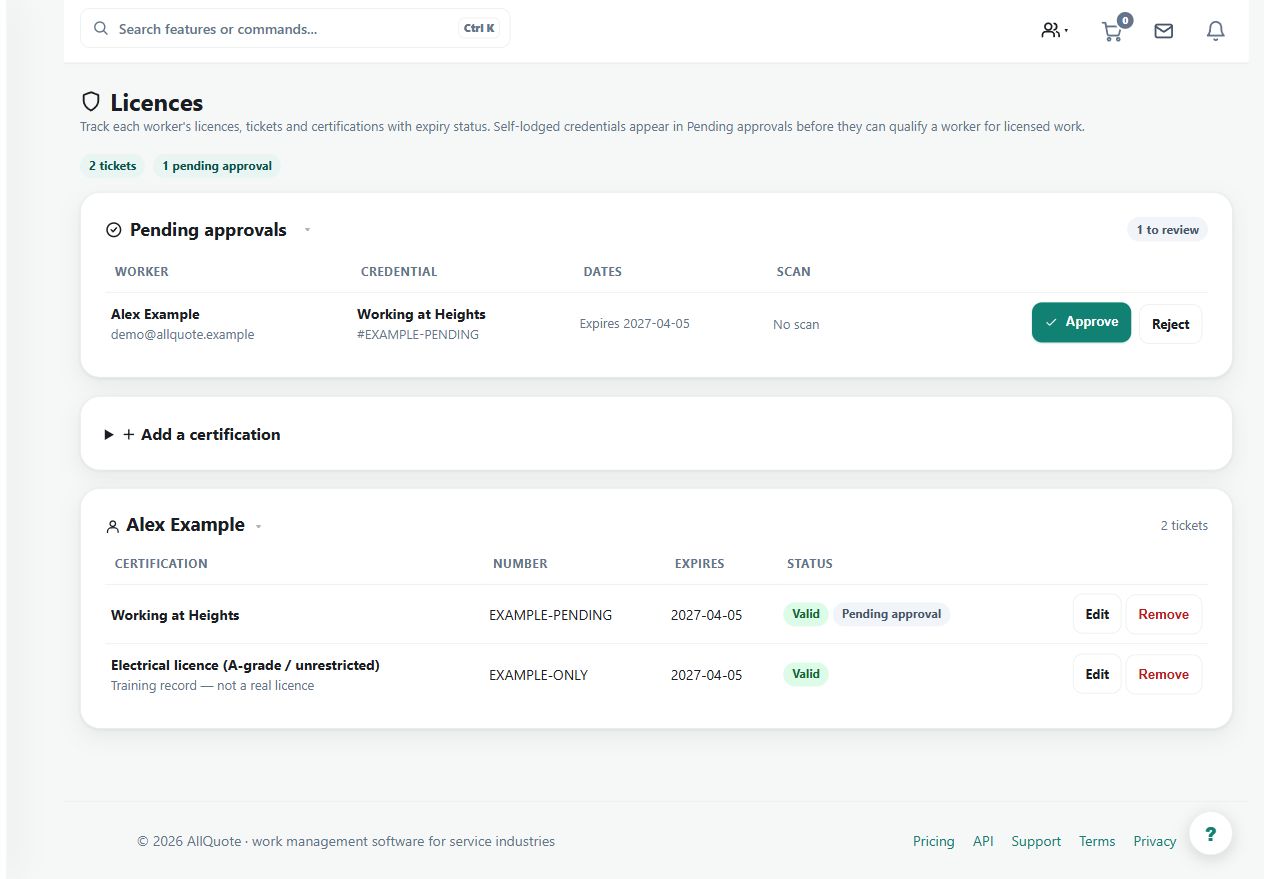
Step by step
- Open Licences at /licences.
- Choose the worker and add each licence, ticket, certificate, expiry date, and status.
- Upload evidence documents where the screen asks for proof.
- Review the register regularly so expired or soon-expiring certifications are corrected before dispatch depends on them.
Worked example
Add a worker's ticket and evidence, check its expiry and status, then review upcoming expiries before allocating work that depends on it.
This is an illustrative scenario. Use your own approved scope, quantities, rates and business rules.
Check the result
Check holder identity, credential type, current status and evidence. Resolve expired or disputed records before they are relied upon.
Limits and troubleshooting
Storing a credential does not validate it with its issuer. Approval and task assignment checks are separate parts of the workflow.
Follow the screenshot tutorial: Manage licences and compliance
Check current plans and feature availability · Browse every guide