Statutory compliance register
Tracks required, lodged, and issued compliance certificate status for supported statutory workflows.
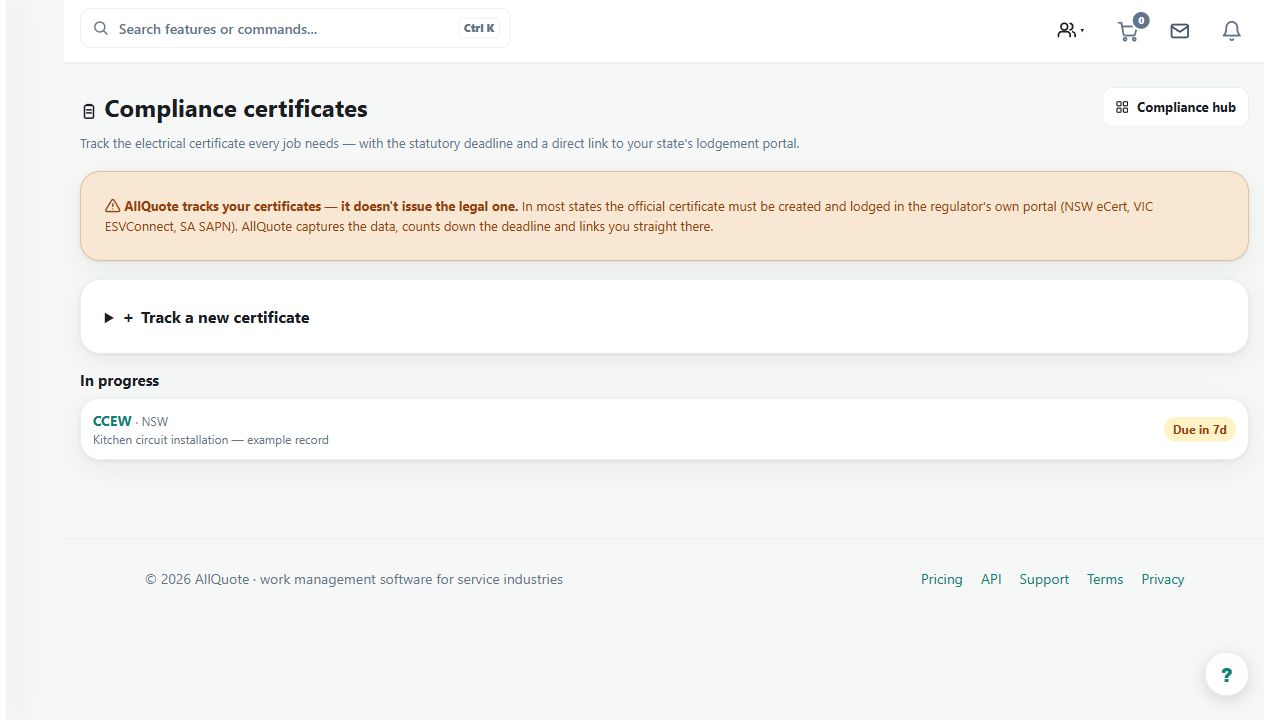
Use the register to track the recorded stage of a supported statutory certificate workflow against a job or site.
Before you start
Availability: Enterprise plan and above. Enabled business features, role permissions, connected providers and supported devices may add requirements.
Documented roles: Owner, Office. A role name alone does not override the permissions set by your business.
Where to find it: Compliance > Certificate register.
Identify the correct job, certificate type and responsible person. Keep the external submission or issue evidence available.
Step by step
- Open Compliance from the sidebar or go to /compliance.
- Create a certificate record for the relevant job or site.
- Record the required, lodged, and issued status as the statutory process moves forward.
- Open the certificate record later to check or update its status before closing the job.
Worked example
Record a certificate as required, update it when lodged, and enter the issued status when the actual certificate is available.
This is an illustrative scenario. Use your own approved scope, quantities, rates and business rules.
Check the result
Compare the register status with the supporting document and external process before closing the related job.
Limits and troubleshooting
A status recorded in AllQuote is not itself a lodgement with an authority or proof that an authority issued a certificate. Keep the evidence and verify the relevant process.
Follow the screenshot tutorial: Manage licences and compliance
Check current plans and feature availability · Browse every guide