Phone and calling - click-to-call
Provides click-to-call and click-to-SMS on contact and job phone numbers. Outbound call attempts are logged before opening the connected phone system or device dialer; external call outcomes need review.
Use click-to-call to open the configured phone system or device dialer while keeping a record of the attempt linked to the work.
Before you start
Availability: Free plan and above. Enabled business features, role permissions, connected providers and supported devices may add requirements.
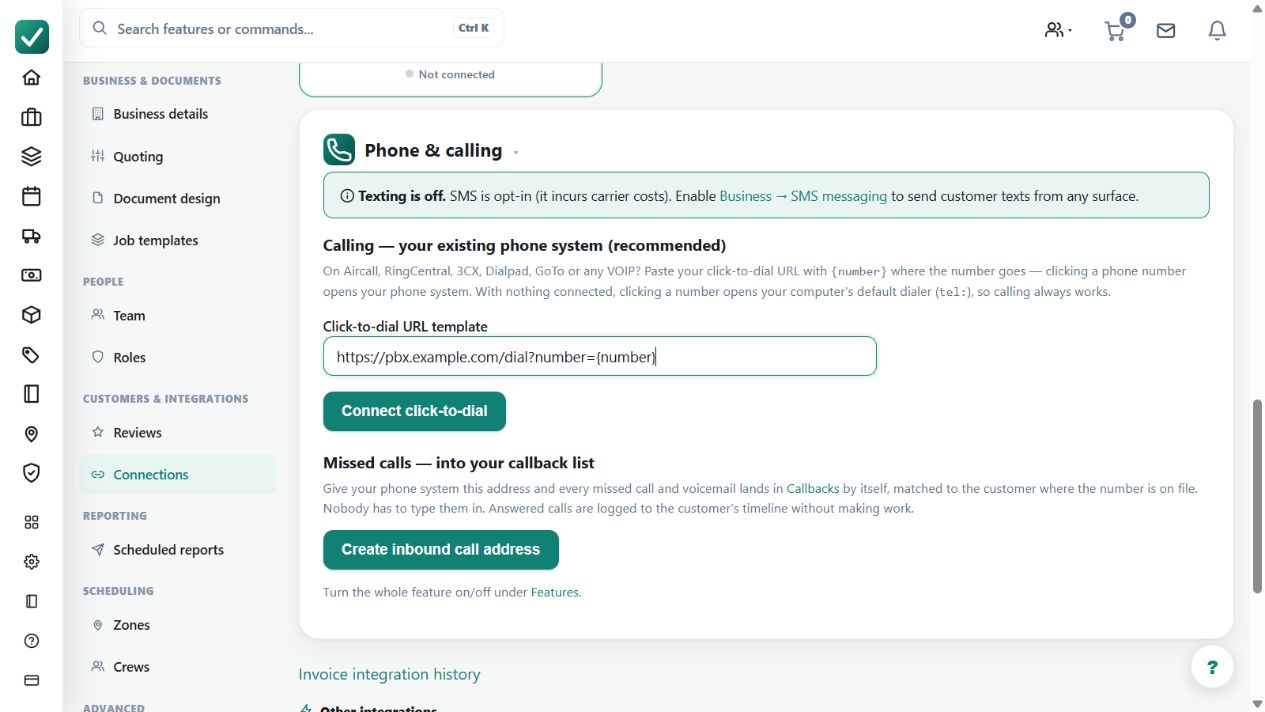
Where to find it: Settings > Business Settings > Connections > Phone and calling.
Check the phone number and the intended customer or job. Connect a supported phone system or use the device's tel: fallback.
Step by step
- Open Business settings > Connections and connect the phone integration, or rely on the device-dialer fallback.
- Click any phone number on a contact or job to call or text.
- Check the call logged against the customer and job afterwards.
- Add a note to the call record where the conversation matters later.
Worked example
Click the customer's number, make the call in the external phone system and add the conversation note or manual outcome to the AllQuote call record afterward.
This is an illustrative scenario. Use your own approved scope, quantities, rates and business rules.
Check the result
Check the linked contact/job and recorded outcome, particularly when the call was unanswered or failed.
Limits and troubleshooting
AllQuote logs the outbound attempt before dialing. External tel: or bring-your-own calls cannot be automatically status-tracked, so a logged attempt is not proof of a completed conversation.
Check current plans and feature availability · Browse every guide